
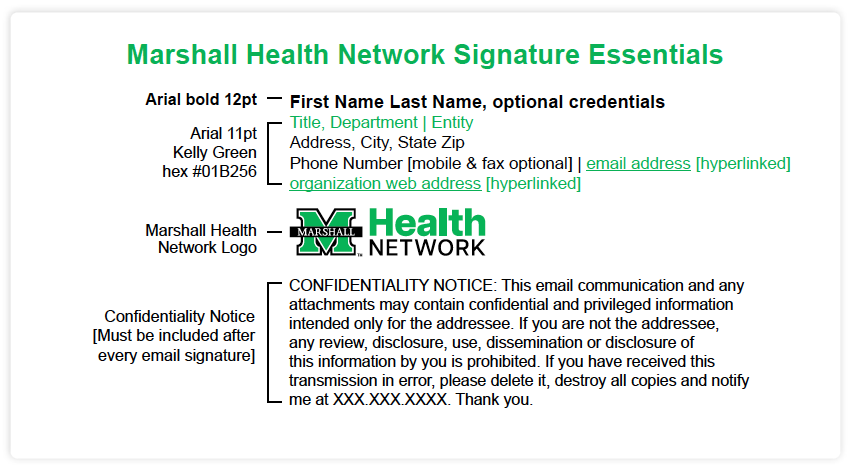
Mascot, Department | Marshall Health Network
1340 Hal Greer Blvd., Huntington, WV 25701
304.867.5309 | marco.bison@mhnetwork.org
marshallhealthnetwork.org

Marco Bison
Mascot, Department | Rivers Health
2520 Valley Dr., Point Pleasant, WV 25550
304.867.5309 | marco.bison@mhnetwork.org
rivershealth.org
Marco Bison
Mascot, Department | Cabell Huntington Hospital
1340 Hal Greer Blvd., Huntington, WV 25701
304.867.5309 | marco.bison@mhnetwork.org
cabellhuntington.org
Marco Bison
Mascot, Department | St. Mary’s Medical Center
2900 1st Ave., Huntington, WV 25702
304.867.5309 | marco.bison@mhnetwork.org
st-marys.org
Marco Bison
Mascot, Department | Hoops Family Children’s Hospital
1340 Hal Greer Blvd., Huntington, WV 25701
304.867.5309 | marco.bison@mhnetwork.org
hoopschildrens.org
Marco Bison
Mascot, Department | Marshall Health
300 Corporate Center Dr., Scott Depot, WV 25560
304.867.5309 | marco.bison@mhnetwork.org
marshallhealth.org
Mascot, Department | Joan C. Edwards School of Medicine
Mascot, Department | Marshall Health Network
1600 Medical Center Dr., Huntington, WV 25701
304.867.5309 | marco.bison@marshall.edu
jcesom.marshall.edu | marshallhealthnetwork.org

 CONFIDENTIALITY NOTICE: This email communication and any
attachments may contain confidential and privileged information
intended only for the addressee. If you are not the addressee,
any review, disclosure, use, dissemination or disclosure of
this information by you is prohibited. If you have received this
transmission in error, please delete it, destroy all copies and notify
me at XXX.XXX.XXXX. Thank you.